Architecture school opens a world of exciting and creative possibilities. It also introduces a steep and sometimes overwhelming digital learning curve.
Clearing NATA or JEE Paper 2 proves your dedication and raw potential. Now, architecture software for B.Arch students determines how confidently you perform in every studio session.
The industry evolved for good in 2026, and now AI-driven workflows are the norm. To catch up with that change, you need the necessary tools.
This guide gives you a clear and practical technology roadmap. Start here and build skills that carry you through every year of your degree.
Mastering the Digital Studio Survival Kit
Every B.Arch student faces long studio nights. Wrong tools cause most of that stress.
The architecture software for B.Arch students changes everything. It turns chaos into a clear workflow.
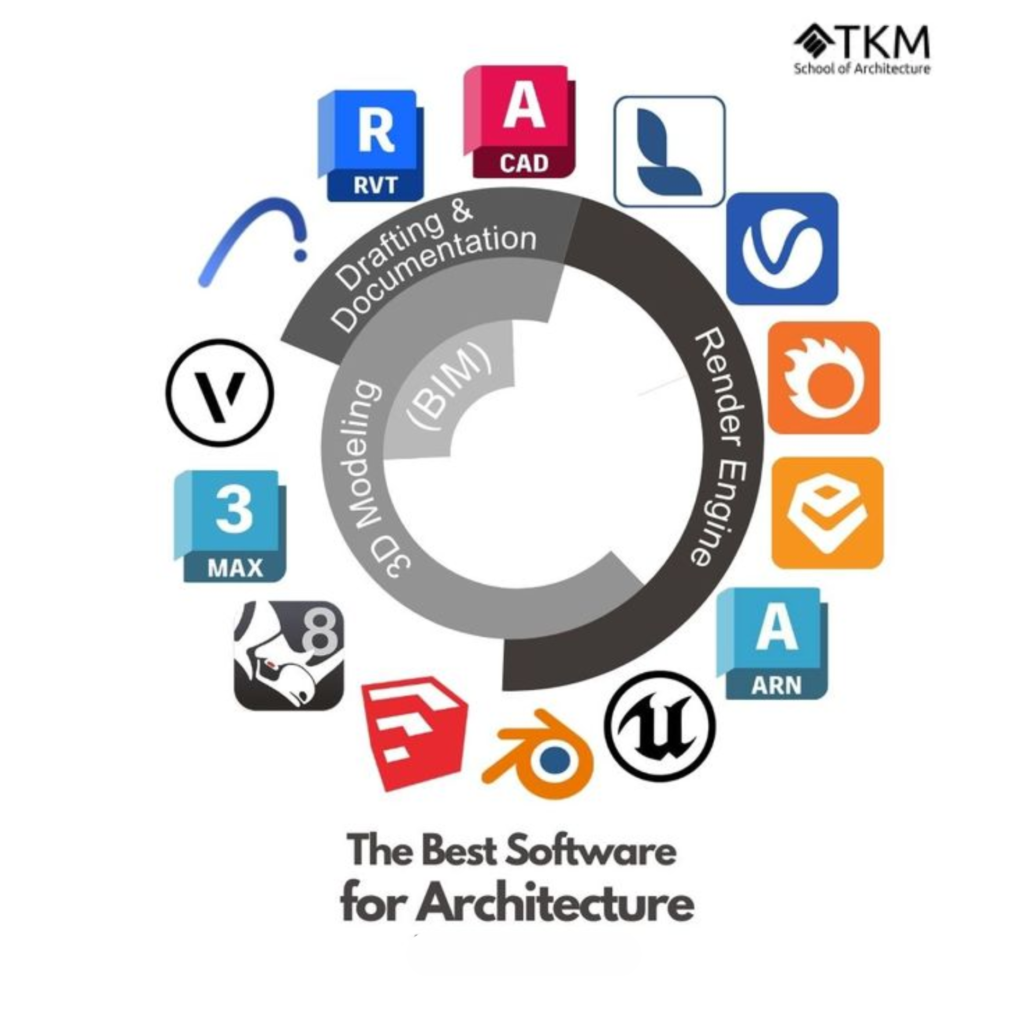
Three tools lead the pack. They each serve a different purpose.
SketchUp lets you build 3D concepts fast. It feels natural from the very first click.
AutoCAD handles precise 2D drawings with ease. Professionals across the industry rely on it daily.
Revit gives you smart BIM modeling. It gets you prepared to handle the demands of practical work.
Such tools don’t compete with one another. They form one powerful system together.
Read our guide on the Lifestyle of a Student Architect. It shows how you may apply these tools in daily life.
Say hello to Priya, a student in her first year of design school. She picks up SketchUp to explore a community plaza idea.
Her concepts take shape within hours. She feels confident instead of overwhelmed.
She then shifts to AutoCAD for technical drawings. Every line lands exactly where it should.
Finally, Revit connects all her work into one smart model. Her submission looks polished and professional.
The best software for B.Arch projects in 2026 does more than save time. It builds the habits that employers value most.
Start with these three tools today. Your studio performance will improve immediately.
AutoCAD vs Revit vs SketchUp for Students: The Workflow Hierarchy
Choosing the right tool at the right time matters most. Strong architecture software for B.Arch students follows a clear phase-based order.
Most students try to learn every tool at once. That approach creates confusion and slows progress.
Break your workflow into three distinct stages. Each stage calls for a specific tool.
Start with 3D modeling for architecture beginners using SketchUp. Its push-pull interface lets you shape bold ideas within minutes.
SketchUp removes technical barriers early in the design process. You focus entirely on form and spatial thinking.
Next, bring your concept into AutoCAD for detailed drawings. This tool produces precise lines that meet professional and permit standards.
Every architecture firm expects AutoCAD proficiency from its staff. You build that credibility while still in school.
| Phase | Tool | Why It Wins |
| Concept | SketchUp | Fast fun for newbies |
| Draft | AutoCAD | Precision pros need |
| Full Project | Revit | BIM magic for teams |
The question of AutoCAD vs Revit vs SketchUp for students always comes down to sequence. Use each tool where it naturally fits your project phase.
Revit enters the picture during advanced development. It links structural, mechanical, and spatial data into one intelligent model.
This integration prepares you for complex professional projects. Firms use Revit to manage entire building lifecycles.
Our article Do Drawing Skills Determine Architectural Success? explores how digital tools now outpace traditional methods in speed and accuracy. That shift makes your software skills a serious career advantage.
Follow this three-step sequence on every project. Your confidence grows stronger with each completed stage.
Future-Proofing Your Career with BIM Workflow for Architecture Students
The architecture industry shifted permanently toward data-driven design. Every firm now expects its new hires to arrive BIM-ready.
Strong architecture software for B.Arch students begins with Revit. It sits at the center of modern professional practice.
The BIM workflow for architecture students builds gradually over time. You start with a simple residential model and grow from there.
Begin by learning families, parameters, and basic floor plans. Each small project sharpens your understanding of how data connects to geometry.
BIM delivers advantages that traditional drafting simply cannot match. These include:
- Tracking costs
- Detecting clashes
- Enabling live team collaboration.
Firms shortlist candidates who already understand these capabilities. Your BIM skills separate your portfolio from the rest.
Many students wonder how to learn Revit for beginners without feeling overwhelmed. Autodesk offers free academic licenses that remove any cost barrier.
Instead of long, random practice sessions, make a plan to practice for short amounts of time every day. Consistency will make you feel more confident faster than cramming will.
Sign up for our Building Information Modeling (BIM) Courses. Get easy steps and help from people who work in the field. The program takes you from foundational concepts to project-ready proficiency.
Structured learning makes it easier for you to become really good at something. You don’t have to try things out and waste time in the studio.
Professionals who command industry-standard drafting tools like Revit attract stronger job offers. Top firms actively recruit students who bring verified BIM experience.
Your career trajectory depends on the skills you build today. Start your Revit journey now and enter the job market with genuine confidence.
AI Integration and Sustainable Design Trends in 2026
A lot of students believe that AI will hurt their creative jobs. It actually functions as a powerful extension of your existing skills.
The architecture software for B.Arch students works well with AI tools today. Smart tools in software like Revit and SketchUp assist you get things done swiftly.
Revit, for example, uses generative design to look at several layout options in one go. You evaluate better solutions in far less time.
SketchUp pairs with rendering engines like Enscape to produce photorealistic visuals instantly. Your client presentations gain a professional edge without extra effort.
Nowadays, a significant component of any major architecture program is sustainable design. AI uses the sun, wind, and shade to help you make better decisions.
These insights help you create buildings that perform efficiently year-round. You design with environmental data rather than guesswork.
The best software for B.Arch projects in 2026 does boring work for you. Your mental energy stays focused on design problems that require human creativity.
AI also flags structural conflicts before they reach the construction stage. That saves firms significant time and money on every project.
Our guide on Artificial Intelligence in Architecture shows how these new tools change the way we do things. It gives you information that keeps your skills up to date and competitive.
Artificial Intelligence in Architecture is for students too, not just experts. B.Arch students who embrace it today build a decisive advantage for tomorrow.
Frequently Asked Questions
-
Which software should a B.Arch student learn first — AutoCAD, Revit, or SketchUp?
Essential architecture software for first-year B.Arch beginners starts with SketchUp. It is the best choice for new students. It builds spatial confidence quickly and supports creative exploration in early studio projects.
-
Is AutoCAD still relevant for architecture students in 2026?
Yes. The essential architecture software for first-year B.Arch beginners still includes AutoCAD. Every office uses it to make 2D drawings and talk to the team.
-
Can B.Arch students get AutoCAD and Revit for free?
Autodesk gives a student license and free software access to students. You just have to show proof that you are in school. You get full tools for a year and can renew them.
-
What is the difference between AutoCAD and Revit?
The essential architecture software for first year B.Arch beginners shows how these tools differ. AutoCAD makes 2D lines. Revit builds 3D models that are smart and show data on costs and materials.
-
Is SketchUp easy to learn for beginners with no software experience?
Yes. Guides for essential architecture software for first year B.Arch beginners recommend SketchUp as the best start. It is like drawing by hand. You can make 3D shapes on your first day.
Conclusion & Call-to-Action
Good skills in architecture software for B.Arch students help you succeed in your job for years. This will help your career grow. Build your digital workflow early and protect that advantage throughout your studies.
A student license and free software access allow you to use Pro Tools for no cost. Use this chance to practice every day from your very first semester.
TKM School of Architecture connects software training directly to real studio practice. Small cohorts of forty students guarantee personal mentorship from experienced professionals.
Read Architecture Students: Their First Year Studio to see how people use these tools in class. Their experiences reflect exactly what TKMSA prepares you for every day.
Secure your place at TKMSA today and take full control of your architectural future. Your journey toward confident, industry-ready design begins with one decision.